


If you have watched an AI assistant confidently invent a median house price, you have seen the problem MCP was built to solve. A language model knows what was written about Australian property before it was trained. It does not know what a suburb sold for last month, and it has no way to find out — unless you give it one.
MCP — the Model Context Protocol — is that way. It is an open standard for connecting an assistant to a live data source, and it is the reason a chat window can answer a question about a specific street instead of a plausible-sounding average.
What an MCP server actually is
An MCP server is a program that publishes a list of tools an assistant is allowed to call. Each tool has a name, a description of what it does, and a description of what it needs from the caller. Nothing more exotic than that.
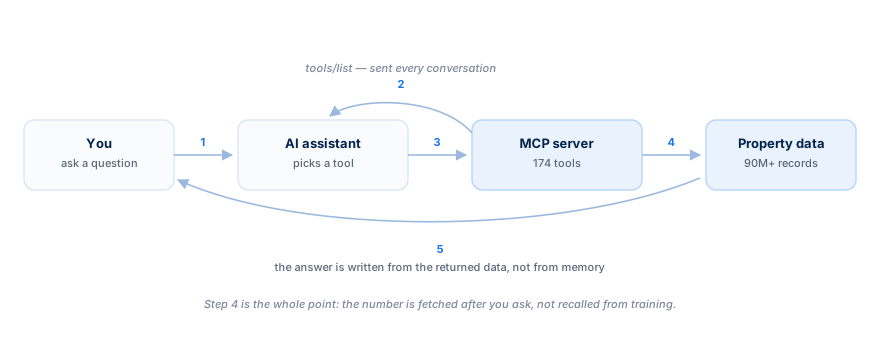
The sequence is worth understanding, because it explains both the strengths and the limits:
- The assistant connects and asks the server what tools exist.
- The server answers with the list.
- You ask a question. The model decides which tool fits, and with what arguments.
- The server runs the call against the real data and returns the result.
- The model reads the result and writes the answer.
The important part is step four. The number in the answer came from a database query that happened after you asked the question. That is a categorically different thing from a number the model remembered.
Why the tool list is the whole ballgame
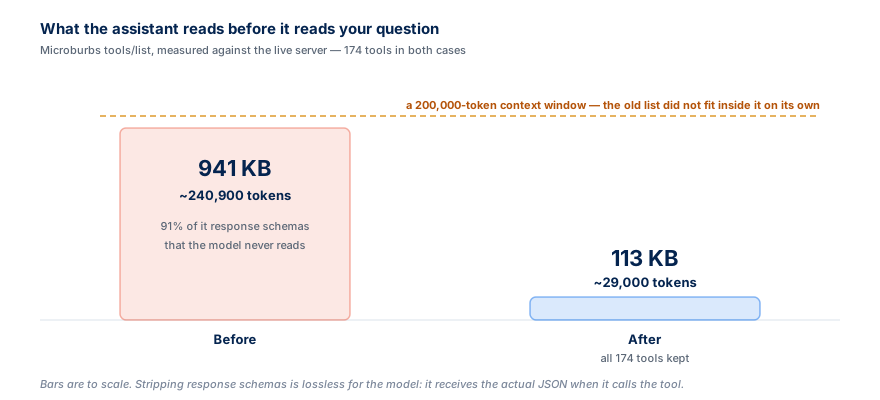
Here is a detail most explainers skip, and it matters more than it sounds: the tool list is sent to the model on every conversation. It competes for the same context window as your actual question.
We learned this the hard way. Our own tool list was 941 KB — roughly 240,000 tokens across 174 tools, of which 91% was auto-generated schema describing the shape of responses the model never reads, because it gets the actual data when it calls. That is larger than most context windows. Every agent that connected was flooded before it could ask anything.
Stripping the response schemas took it to 113 KB, about 29,000 tokens, with all 174 tools intact. If you are evaluating an MCP server, ask how big its tool list is. It is the difference between a connector that works and one that technically exists.
Tool annotations, and why your assistant asks permission
Each tool can carry annotations — small declarations about what it does. The one that matters most is readOnlyHint: does this tool only read, or can it change something?
Clients use it to decide what needs your approval. A tool with no annotation has to be treated as though it might delete data, so it lands in a catch-all bucket you approve by hand, one at a time. Every one of our 174 tools is a read against a property database — but until we said so explicitly, clients had no way to know. Now all 174 declare it, which is also a hard requirement for both Anthropic's and OpenAI's connector directories.
Transport: Streamable HTTP, not SSE
MCP has had two transports. The older one, SSE, is being retired. The current one is Streamable HTTP, which is what our endpoint speaks. If a setup guide tells you to add a URL ending in /sse, it is describing the old way.
Authentication is a single header, and there is no OAuth dance:
Authorization: Bearer mib_live_...
One practical warning: if a connector dialog offers you only OAuth with no field for a header or an API key, our key has nowhere to go. That is the situation in ChatGPT's connector dialog today. Claude, Claude Code, Cursor, Zed and VS Code all take the header directly.
The MCP Registry, and how assistants find servers
There is now an official MCP Registry — a public index of servers, so a client can discover them rather than requiring you to paste a URL. We are listed there as au.com.microburbs/property-data, and the listing propagates to third-party directories that read from it.
Registry inclusion is not an endorsement by anyone. It means the server exists, is reachable and describes itself honestly. Treat a directory badge as a starting point for your own evaluation, not a substitute for one.
What our MCP server exposes
Our tools are generated directly from our REST API, so the tool list and the API can never drift apart. That covers valuations with confidence ranges, sale and rent history, comparable sales, suburb market metrics, demographics, schools, transport, risk overlays, zoning and development activity — across every Australian address and locality.
Two conventions are worth knowing before you connect. Suburb tools are keyed by the exact ABS Suburb and Locality name, so it is Burwood (NSW) rather than Burwood — call the geocode tool first and use the name it returns. Property tools are keyed by GNAF id, which the address geocoder resolves for you.
Try it before you commit to anything
You do not need an account to see whether this is useful. The sandbox key is the literal string test, and it works on nine sample suburbs — one per state and territory — without ever being billed.
The setup guide for each client is at our MCP connection guide. If you would rather build against the REST API directly, the full endpoint reference is browsable without signing in, and API access explains how pricing works. If you just want to ask questions without configuring anything, Microburbs AI Chat is the same data with the plumbing already done.
Frequently Asked Questions
Do I need to write code to use an MCP server?
No. In a chat client it is a URL and a header pasted into a connector dialog. Writing code is for building your own application, and for that the REST API is usually the better fit.
Is MCP the same as an API?
Not quite. MCP is a wrapper that describes an API in terms an assistant can reason about — which tools exist, what each needs, and whether calling one is safe. Underneath, ours calls the same REST endpoints you could call yourself.
Does connecting an MCP server cost money?
Connecting is free, and so is listing the tools. Calls are billed per endpoint in cents, and eight endpoints cost nothing at all. The sandbox key is never billed.



![Australian Property Data MCP Server: Connect Claude, Free [2026]](/_next/image?url=%2Fimages%2Fblog%2Fblog-ai-tech.jpg&w=3840&q=75)